RLLBILINK® Turn Raspberry Pi | Orange Pi | Old computers into free P2P internal network penetration routers.
 中文
中文 EN
ENLatest events
- The tests for the home broadband scenarios of China Telecom, China Unicom and China Mobile, as well as the broadband scenario test for KDDI in Japan, have been completed. The P2P throughput rate and availability rate have both reached 100%
- Optimized the internal network proxy mechanism, allowing users to specify which addresses and domains should be forwarded locally (without going through the P2P tunnel).
- Fixed the bug that might prevent access to the local machine via http://rollbilink.config.
- Fixed the bug causing slow protocol synchronization during P2P hole punching.
- Enable the virtual machine to be set to NAT mode for network configuration.
- Fixed the error where the proxy list could not accept subnet addresses as input.
- The download link leads to the directory, making it convenient for users to select the desired version.
- Fixed the error in the vendor display on the Raspberry Pi 3b+.
- Fixed the issue where records were not deleted after a hole-punching operation failed.
- New download links for Baidu Netdisk and huang1111 Netdisk have been added.
- Here is a public server node available for free testing. Anyone who using ROLLBILINK® router can attempt to connect to it using the TUNID 20003051 and password rollbilink, and then access my NAS via the local network IP address 192.168.5.11. The username is test and the password is test123. However, for security reasons, the service node can accommodate a maximum of only 8 client nodes.
- The GitHub repository for the project is available, the download links for the release has been moved to GitHub.
About the ROLLBILINK® ?
What's the ROLLBILINK® ?
ROLLBILINK® is a free but non-open-source public welfare project. It is specifically designed for popular open-source hardware and x86_64 computers. It can turn Raspberry Pi, Orange Pi R1 LTS, various PCs, laptops, servers, even VirtualBox and VMware virtual machines into High-performance routers that support P2P internal network penetration.
Best of all, you just make a ROLLBILINK® router and you can share your LAN with anyone who also has a ROLLBILINK® router.
The term "ROLLBILINK" has a dual meaning:
- It is derived from the homophonic sound of the Chinese phrase "若比邻 [ruo bi ling]" and metaphorically implies that no matter where you are, it enables you to use the internal network as conveniently as if you were at home. It is as if another secure network has been built on top of the Internet.
- It is composed of three words: ROLL | BI | LINK, which respectively represent output, business intelligence and link, indicating an intelligent network link that can serve business activities.
What can ROLLBILINK® do?
ROLLBILINK® can provide basic IPv4-based routing services and point-to-multipoint internal network penetration services, thus can be used as a home gateway, SDWAN gateway, encryption gateway, NAS companion, and SASE box, etc.
The working principle of ROLLBILINK®
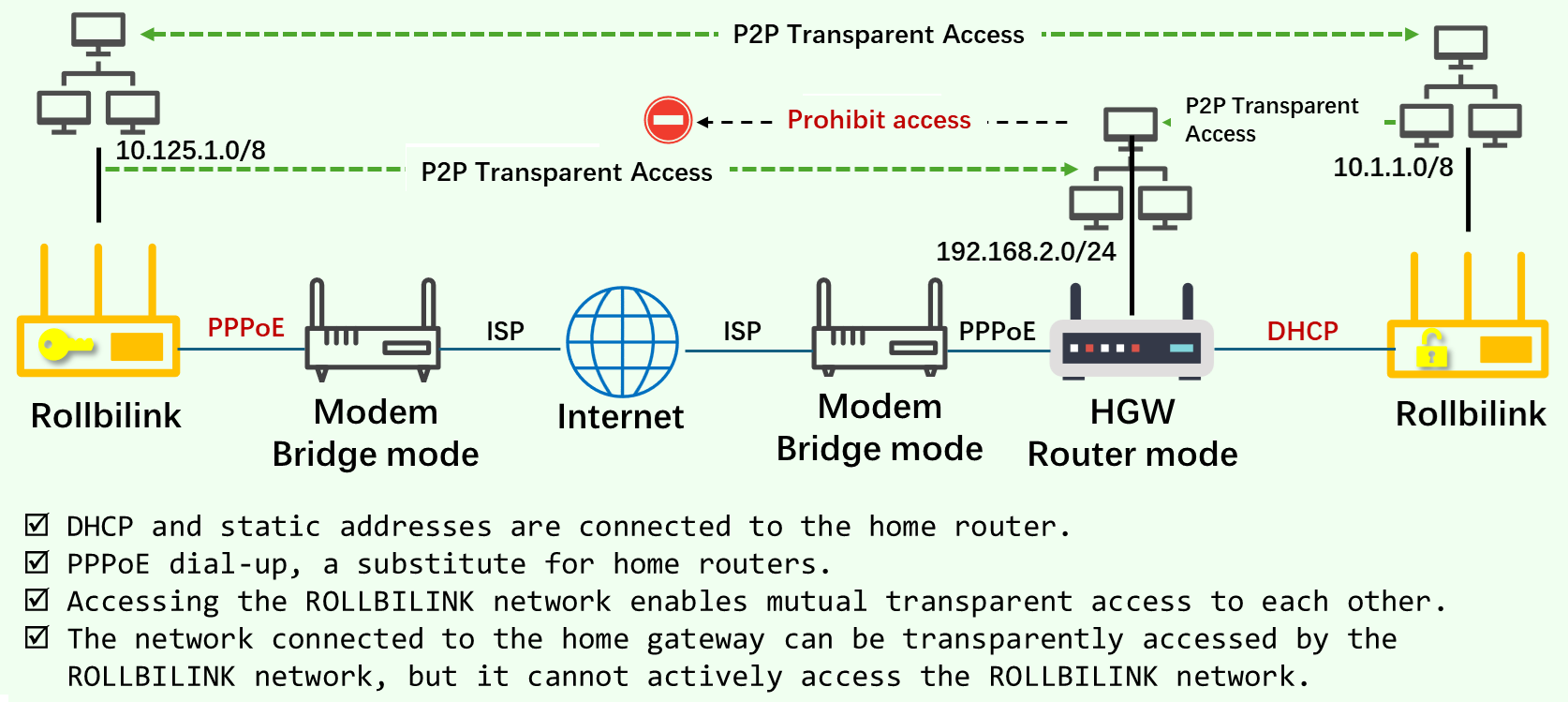
Unlike most reverse proxy solutions based on protocol identification and port mapping, ROLLBILINK® is a true router. It connects to the ISP operator network via PPPoE dial-up, DHCP or static address configuration on the upper layer, and provides DHCP services on the lower layer, supporting wired and WLAN links, allocating IP addresses for customers and handling basic L3 routing forwarding tasks. At the same time, it also has some very practical new features.
- The ROLLBILINK® router first establishes a secure link to the scheduling server. Through this server, different nodes can discover each other based on security policies and establish transparent P2P tunnels across the NAT.
- The ROLLBILINK® network is star-shaped. Each virtual local area network has exactly one service node and multiple client nodes. Each client node and service node are interconnected through a transparent P2P tunnel. Nodes within the same virtual local area network can communicate with each other.
- The ROLLBILINK® router is designed based on the L3/L4 layers and is transparent to the application layer. It can be installed and used immediately, and once installed, users will forget about it. There is no need for users to have knowledge of the network.
- Supports both UDP and TCP P2P tunneling protocols. The algorithm will detect the network and automatically select the optimal protocol. The tunneling success rate is over 95%. The link is stable and can fully utilize the bandwidth.
- The ROLLBILINK® router can handle L3 forwarding normally. Therefore, it can replace a home router or be used as a secondary router.
- When the ROLLBILINK® router is deployed as a secondary router or in a bypass mode, it will not affect the existing network topology of the users.
- The ROLLBILINK® still works well because it can establish a secure tunnel more quickly, preventing your computer from being exposed due to having a public IP address.
The ROLLBILINK® network configuration diagram
|
The hardwares supported by the ROLLBILINK®
ROLLBILINK® supports the open-source hardwares and x86_64 computers listed in the following table.
| Product | Processor | Core | Architecture | OS |
|---|---|---|---|---|
| Raspberry Pi 1 | BCM2835 | ARM1176 | arm6hf | Raspbian Lite (32bit) |
| Raspberry Pi 2 | BCM2836 | Cortex-A7 | armhf | Raspbian Lite (32bit) |
| Raspberry Pi 3 | BCM2710 | Cortex-A53 | arm7hf | Raspbian Lite (64bit) |
| Raspberry Pi 4 | BCM2711 | Cortex-A72 | arm64 | Raspbian Lite (64bit) |
| Raspberry Pi 5 | BCM2712 | Cortex-A76 | arm64 | Raspbian Lite (64bit) |
| Orange Pi R1 Plus LTS | RK3328 | Cortex-A53 | arm64 | Ubuntu 64bit server (bionic) |
| MediaTek | MT7620N/A | MIPS24Kec | mips | Linux 2.6.36 SDK |
| Computer | x86 compatible series | / | x86_64 | Ubuntu 64bit server (bionic) |
| VirtualBox | Same as the host | Same as the host | x86_64 | Ubuntu 64bit server (bionic) |
| QEMU | any | any | any | Ubuntu 64bit server (bionic) |
Download ROLLBILINK® firmware and Installation files
The latest version:0.02-r5885 build at 2026/7/8
Method 1: download from huang1111 netdisk. Recommended, no login required.
Link:https://pan.huang1111.cn/s/vV32YSE
Method 2: download from Github. Update lagging behind. Users from the Chinese mainland will experience slower speeds.
Link:https://github.com/koffman1101/rollbilink/releases
Method 3: download from Baidu netdisk. Alternative address, requires login.
Link:https://pan.baidu.com/s/1p8hP9OasaGIiaBRAw6aNaw?pwd=8vf7
Method 4:Contact the author to obtain the latest version.
Reminder: For your safety, please be sure to verify the downloaded firmware by checking the chksum file provided in the download link.
- Windows users open the cmd or PowerShell and enter: certutil.exe -hashfile "full path name" sha256 to calculate the SHA256 checksum.
- Linux user open the terminal and enter: sha256sum "full path name" to calculate the SHA256 checksum.
Download the burning tool
Usage
ROLLBILINK® is a pre-compiled firmware and an ISO format installation file. Even if the user has no professional knowledge at all, they can follow the instructions in this article to create a software router that is comparable to a paid internal network penetration router within a few minutes.
Essential materials
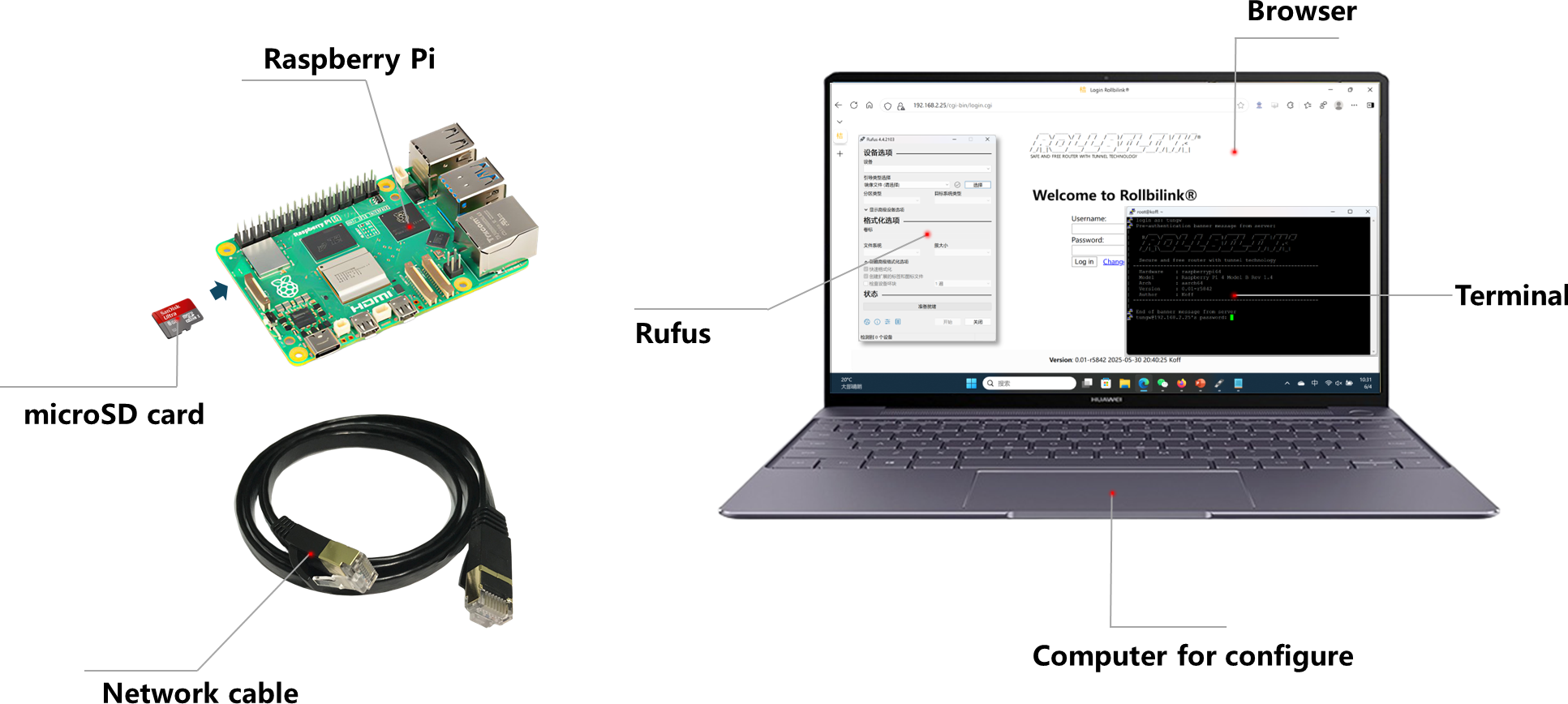
- In order to achieve NAT traversal, ROLLBILINK® routers must be used in pairs. Therefore, at least two pieces of hardware for installing the system need to be prepared. The hardware listed above can be chosen freely.
- The same quantity of Class 10 and U3 level, with a minimum capacity of 8GB, high-speed MicroSD cards. If using a virtual machine, at least 8GB of space needs to be pre-allocated for the virtual disk.
- A computer used for manufacturing ROLLBILINK® routers. It comes pre-installed with Windows, Linux or MAC. Windows computers require the installation of Rufus or other burning software.
- A high-speed card reader.
- At least one network cable.
If there is only one piece of hardware, then the other one can be replaced by installing Virtualbox、Vmware or QUME virtual machines on the computer.
Optional materials
- USB wireless network card, providing WiFi capability for hardware without built-in Wireless function.
- A small Hub or Switch is needed to connect multiple devices to the ROLLBILINK® network.
- HDMI/Mini HDMI connection cable, so as to observe the output information of the system when the Raspberry Pi starts up.
Not all USB wireless network cards come with complete Linux drivers. Before purchasing, be sure to ask the merchant carefully to confirm whether the product supports the AP + Manage capabilities under Linux. You can also refer to this open list of functions for USB WiFi chips to assist in your selection.
Start installing
Installing on Raspberry Pi
- Refer to the picture below to prepare for the installation.
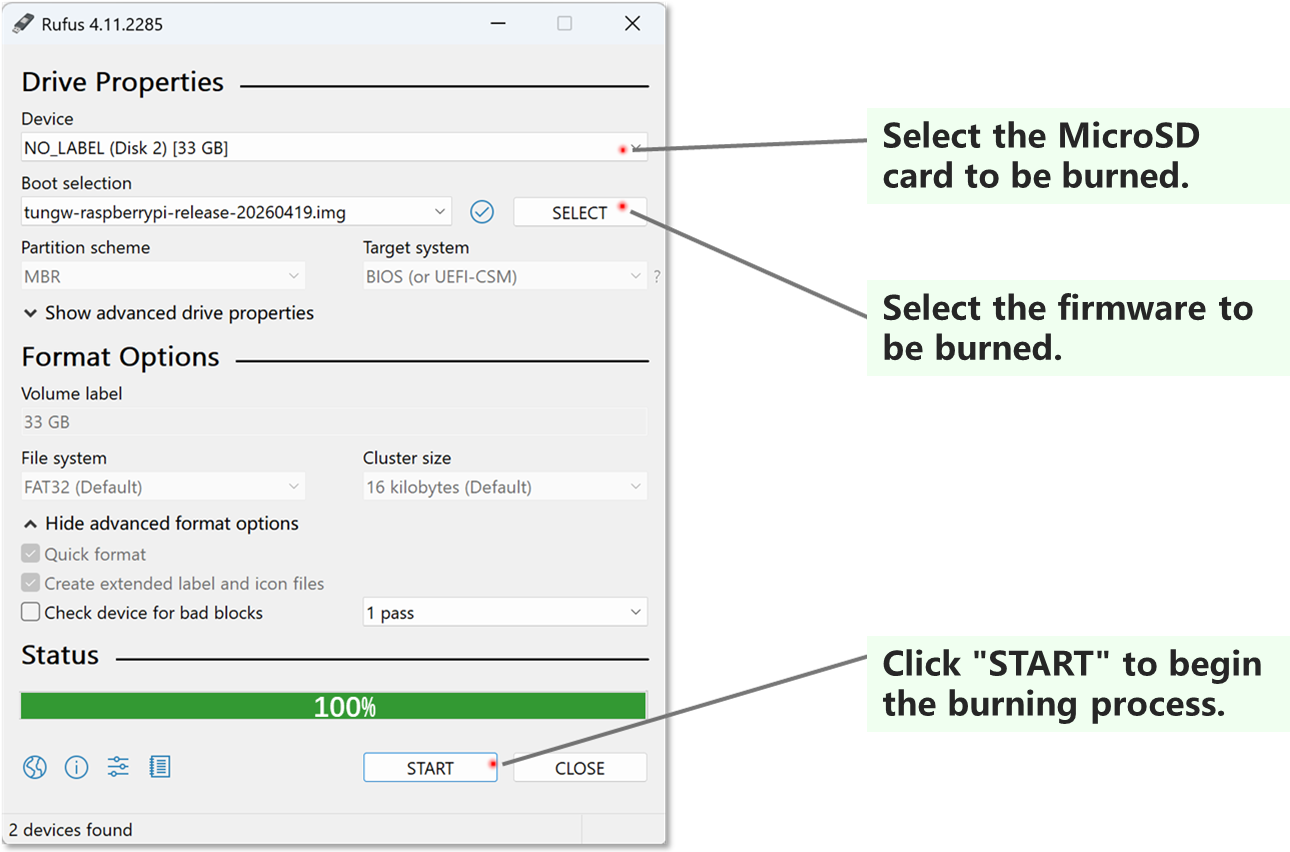
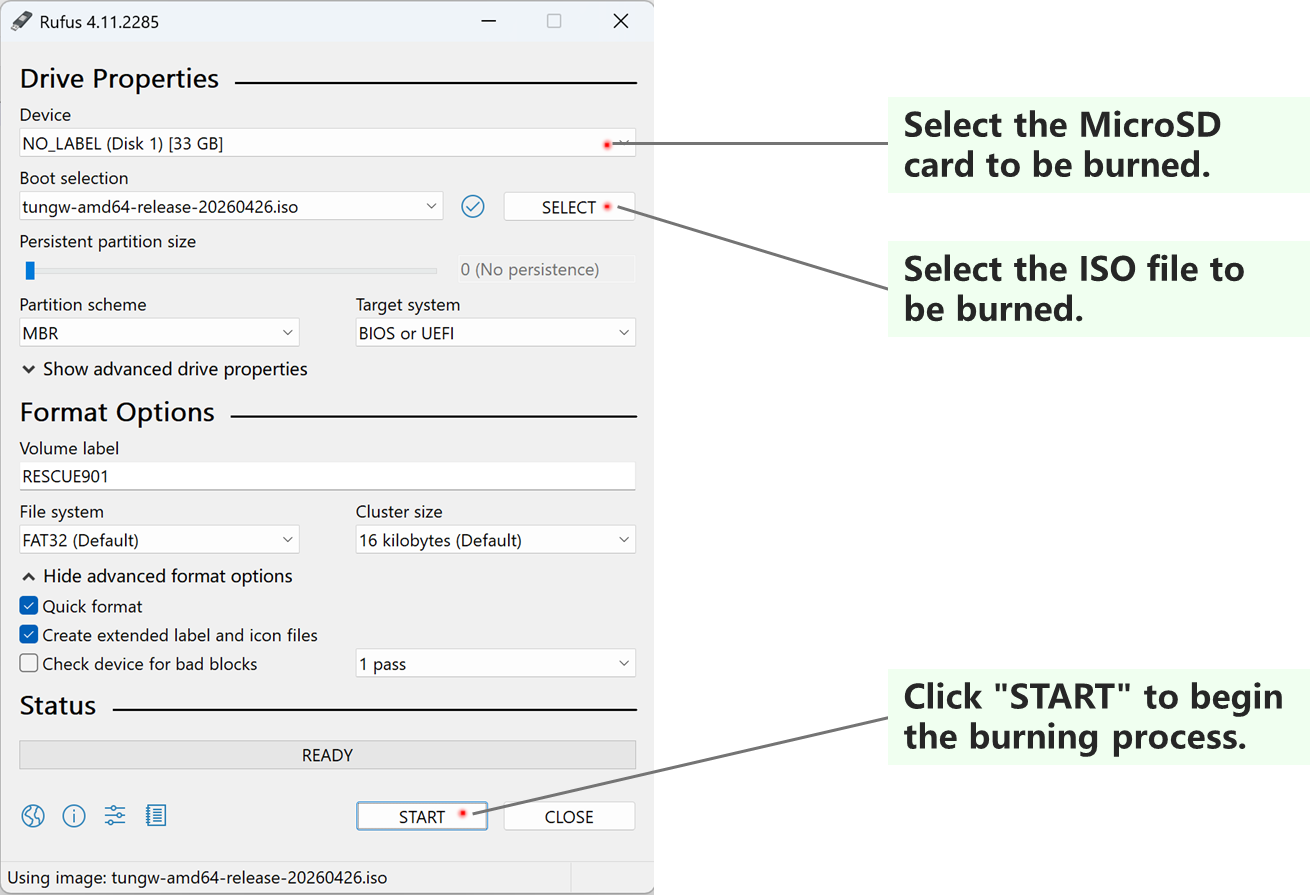
- Launch Rufus and follow the instructions in the picture to burn the firmware.
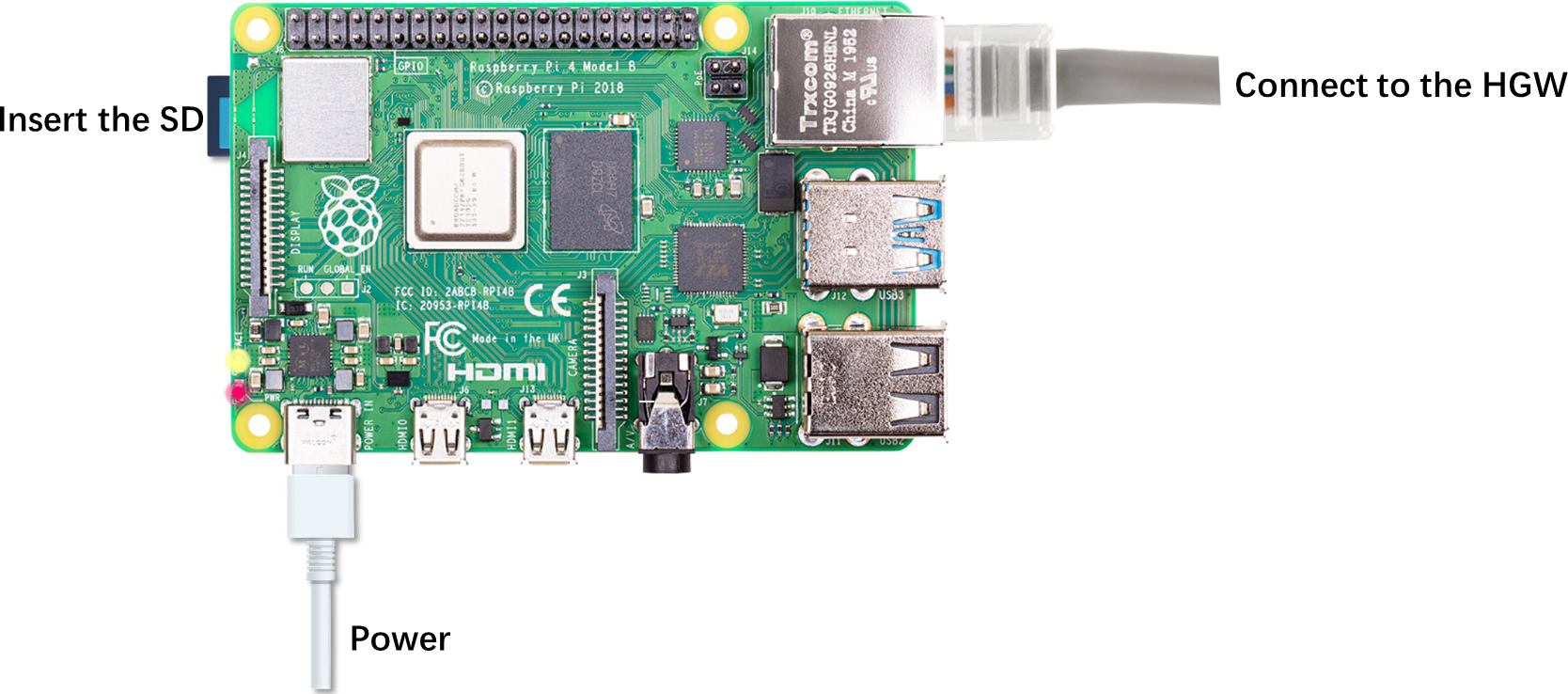
- Insert the prepared SD card into the card slot of the Raspberry Pi, connect the network cable to the LAN port of the home network gateway (router), and then plug in the power supply to start.
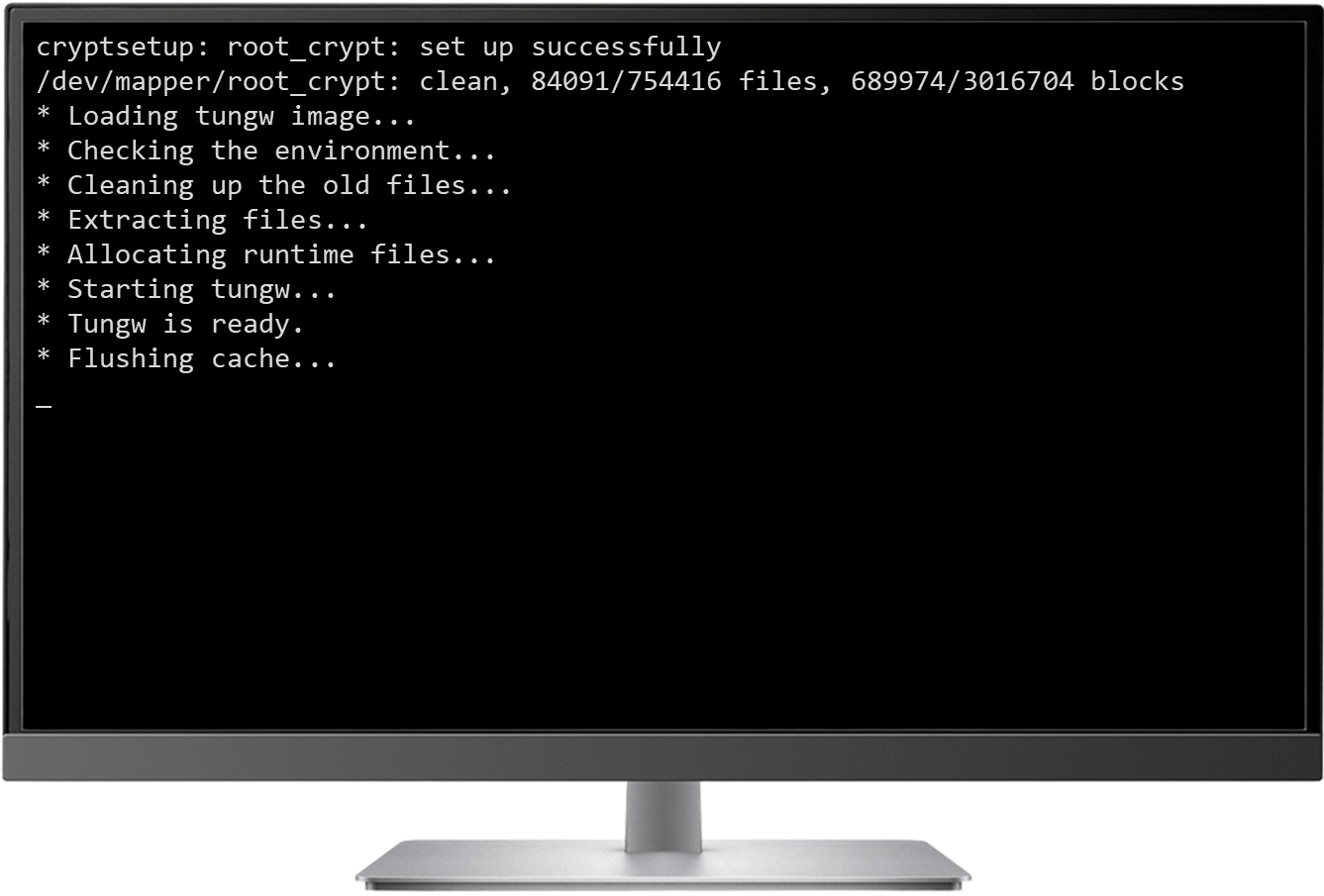
- If you have an HDMI cable, you can connect it to the monitor to observe the startup process of the Raspberry Pi.
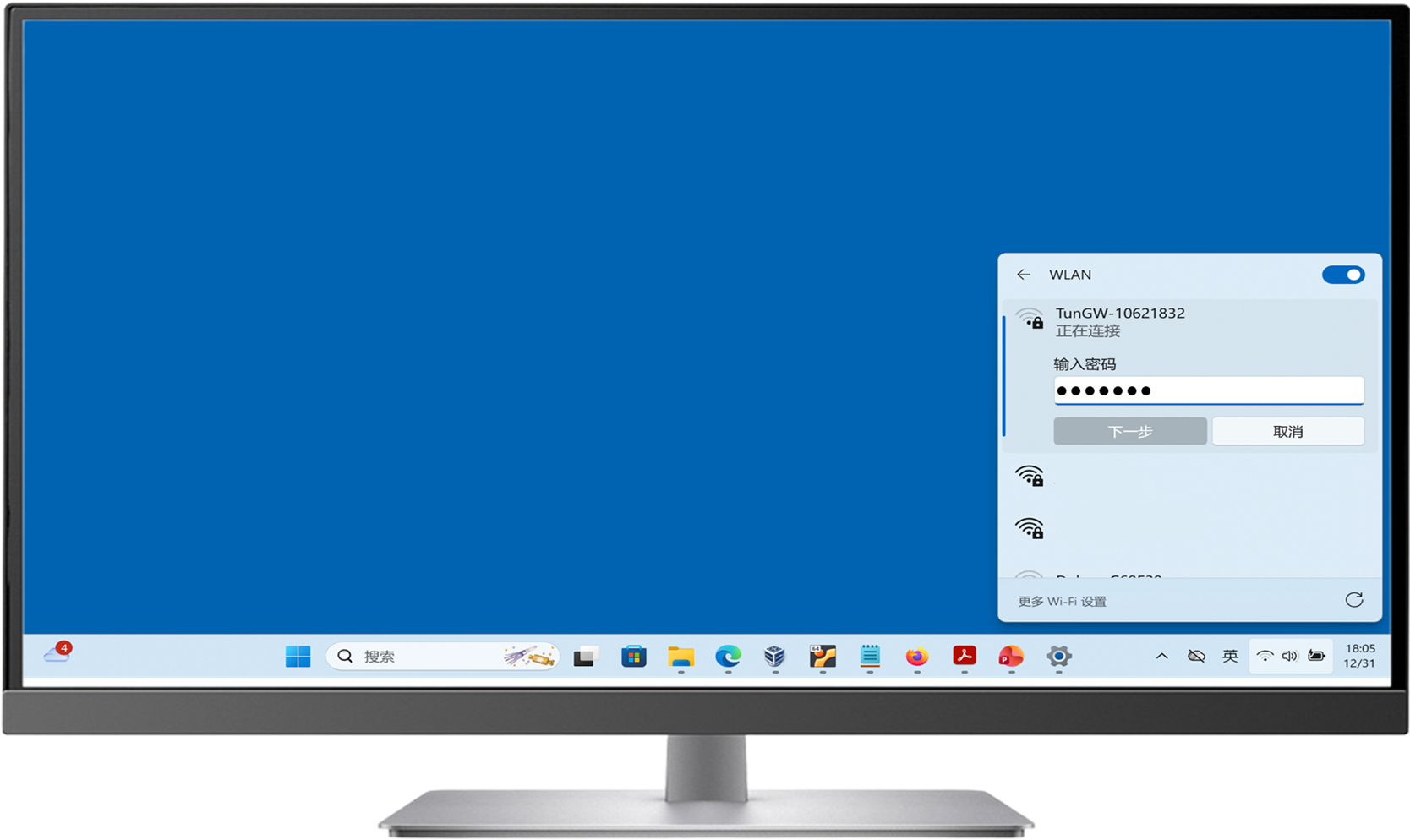
- Search for WiFi hotspots. You can see the SSID with the TunGW- prefix followed by 8 digits. Enter the default password: TunGW@1101 to connect.
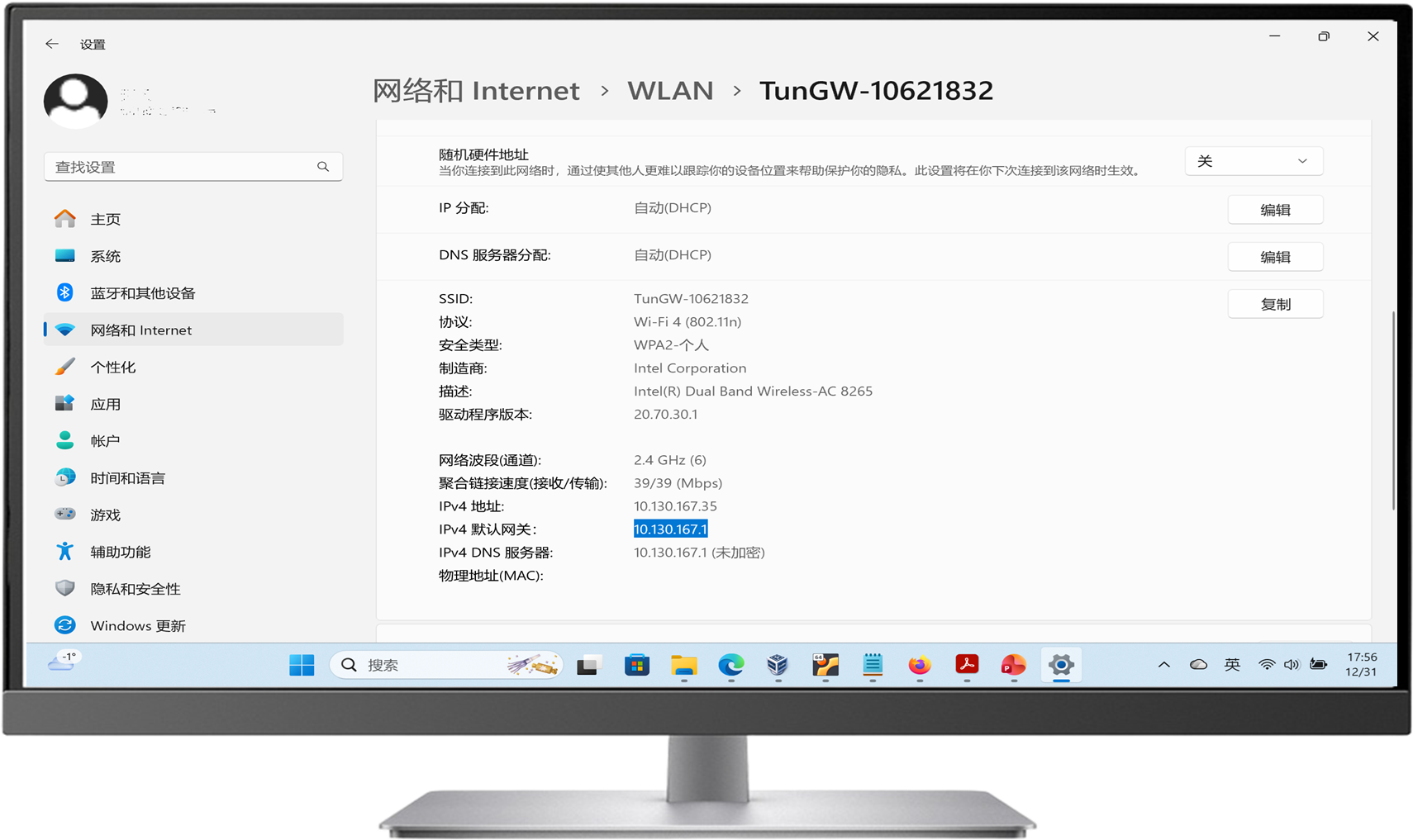
- After the connection is successful, open the network information and check the gateway address.(Optional)
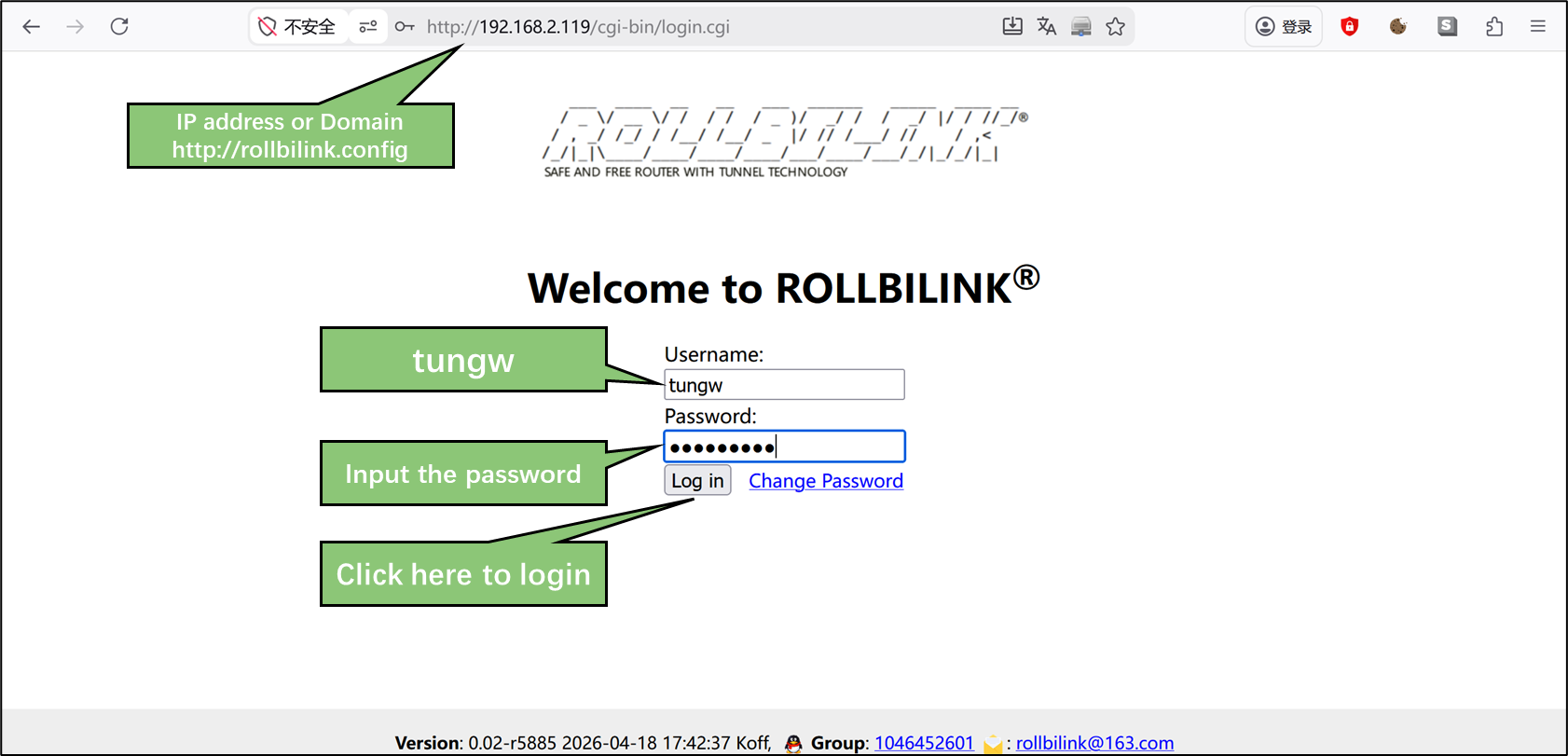
- Launch the browser and enter http://rollbilink.config or the IP address obtained in the previous step. When logging in for the first time, the system will force the user to change the password. Enter the default password TunGW@1101 to proceed with the modification.
|
|
|
The first thing you see is the system loading information.
|
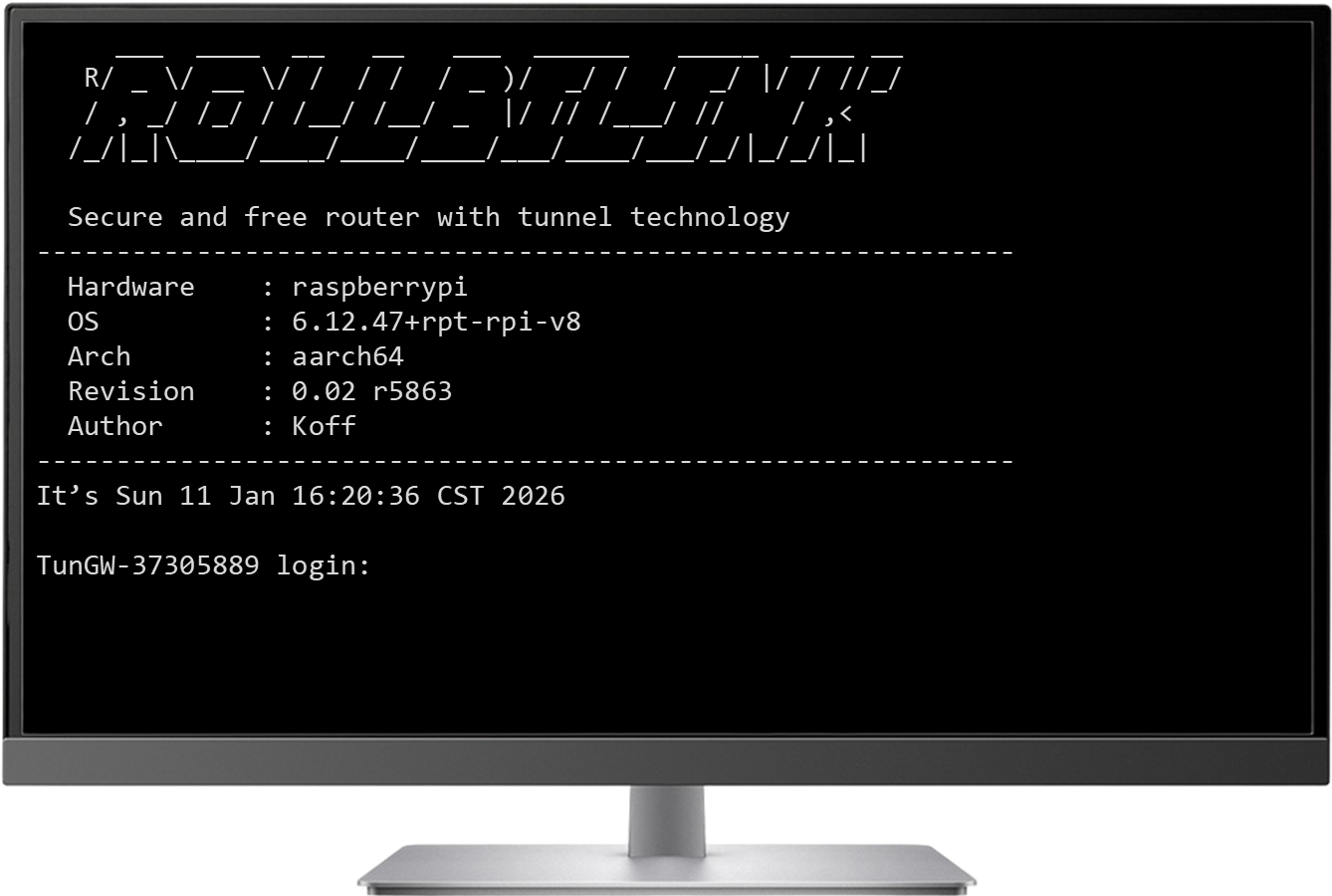
After the loading is completed, the terminal login prompt will be displayed.
|
|
For security reasons, the IP address of the ROLLBILINK router will not be displayed on the terminal login interface.
If you want to access through the home network, you need to query your home gateway to obtain the IP address obtained by the ROLLBILINK router.
A simpler method is to connect to a WiFi hotspot and then directly access the domain: http://rollbilink.config。
|
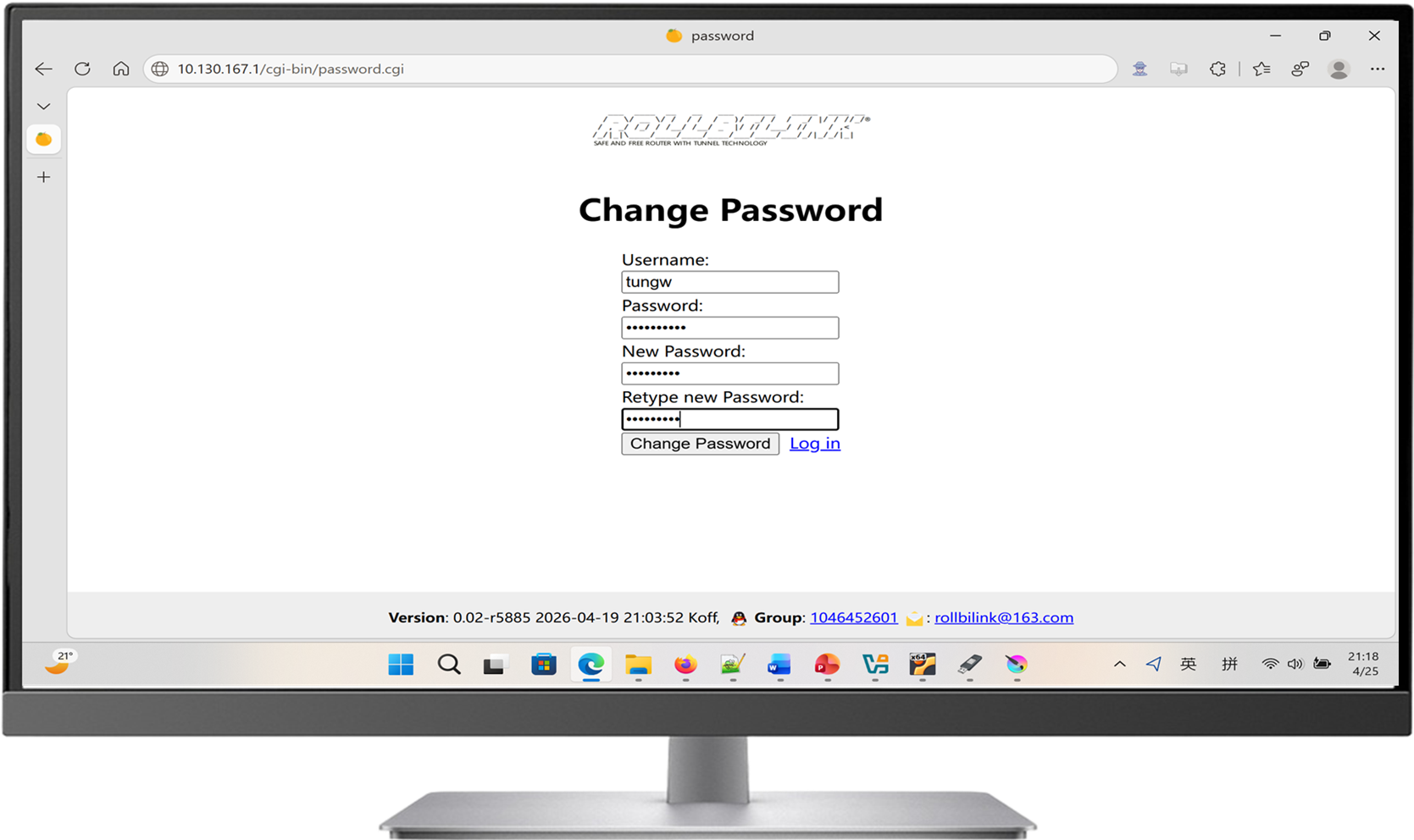
|
The password must include letters, numbers and special characters. This modification applies to both web passwords and terminal passwords.
At this point, this Raspberry Pi has transformed into a router with the ability to penetrate the internal network. 😄
Installing on the Orange Pi R1 Lts
Orange Pi R1 Lts is an open-source hardware that is quite popular among Chinese gamers. It offers good value for money and is highly suitable for creating ROLLBILINK® and the process is the same as installing on a Raspberry Pi. However, be aware of the following differences.
- The Orange Pi R1 Lts is equipped with two RJ45 network ports. The wiring method is shown in the following diagram.
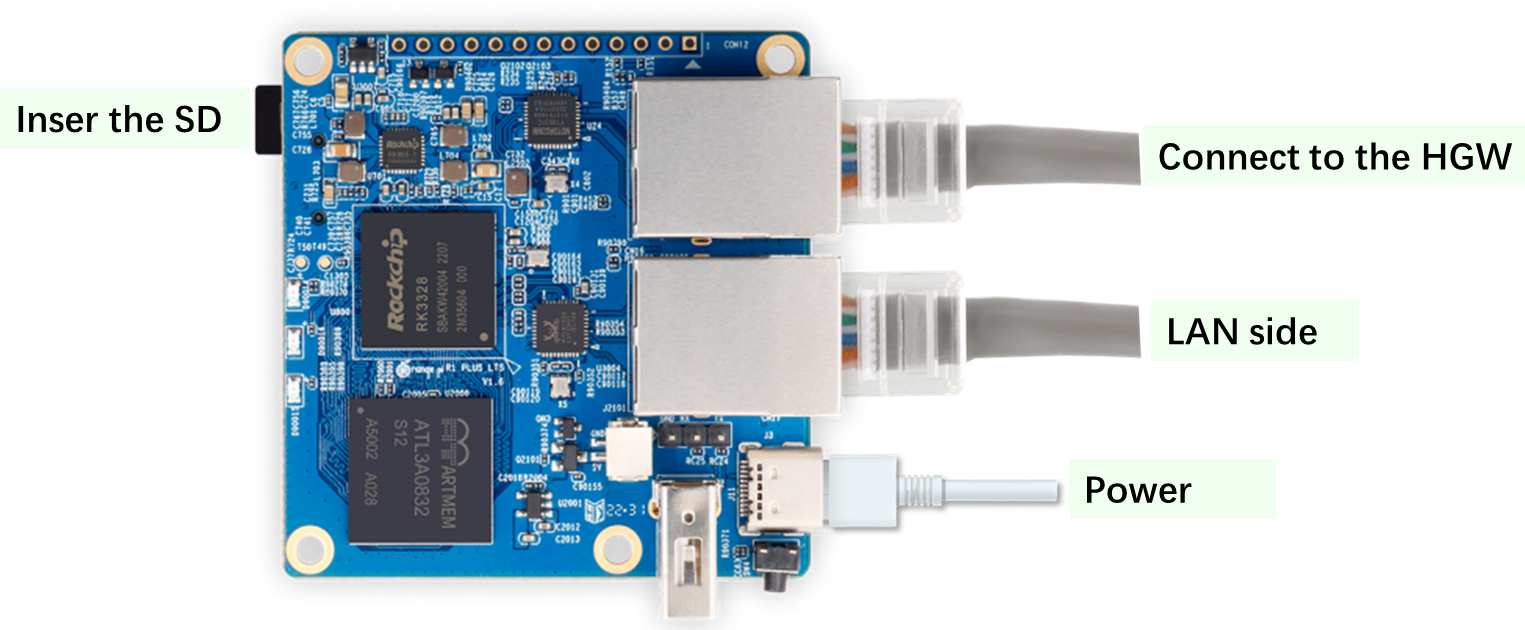
- The Orange Pi R1 Lts does not support HDMI, so it cannot monitor the system output information during the startup process via HDMI. However, players can achieve the same goal through the serial port. For detailed instructions, please refer to the official manual of Orange Pi.
- The Orange Pi R1 Lts does not have a wireless chip, but it can be equipped with a USB wireless network card to enable WiFi functionality.
Install on computers, laptops, servers and virtual machines
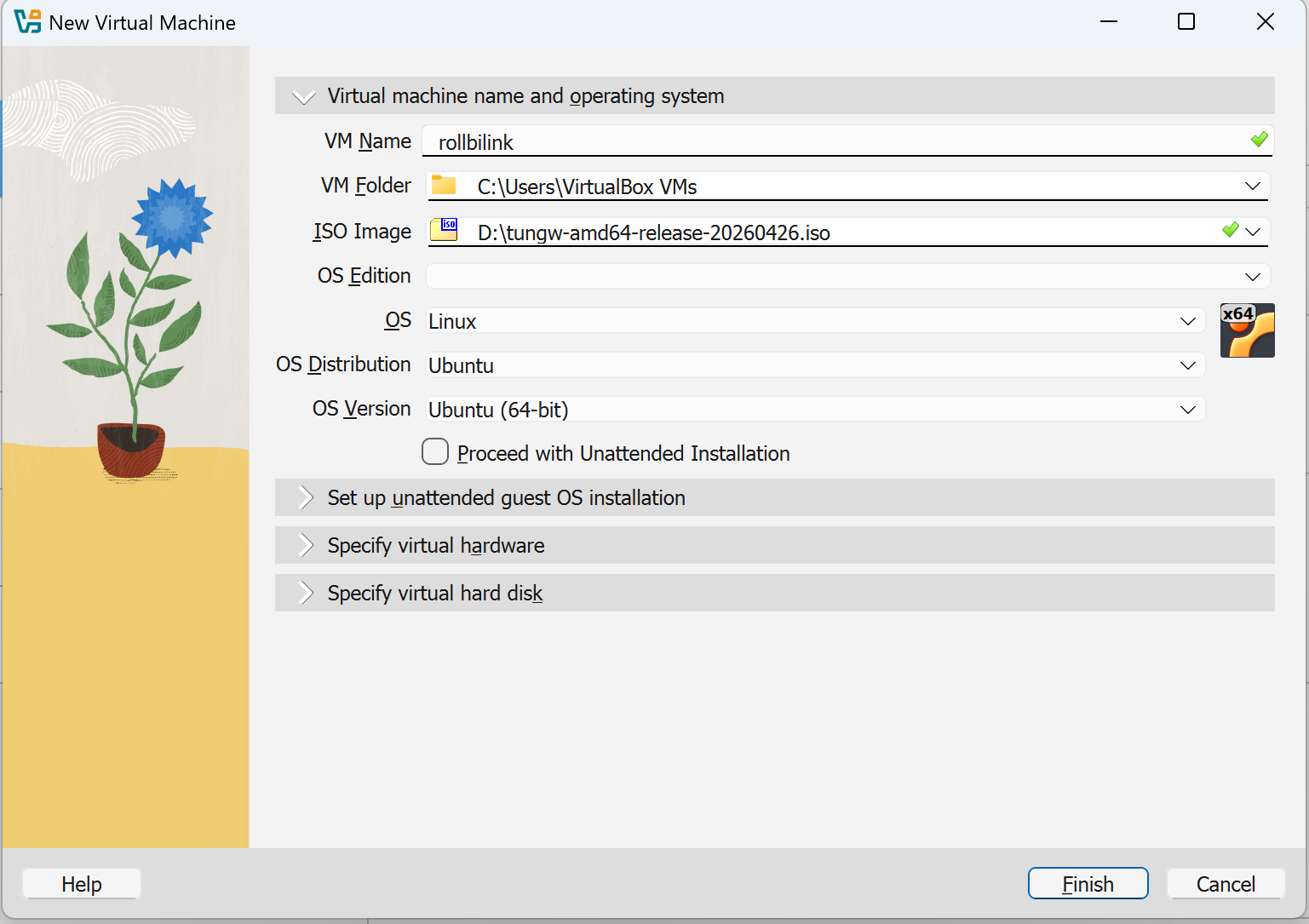
The process of installing ROLLBILINK® on computers, laptops, servers and virtual machines is the same. Here, we will illustrate it by taking the installation on a Virtualbox virtual machine as an example.
- Create a bootable USB drive
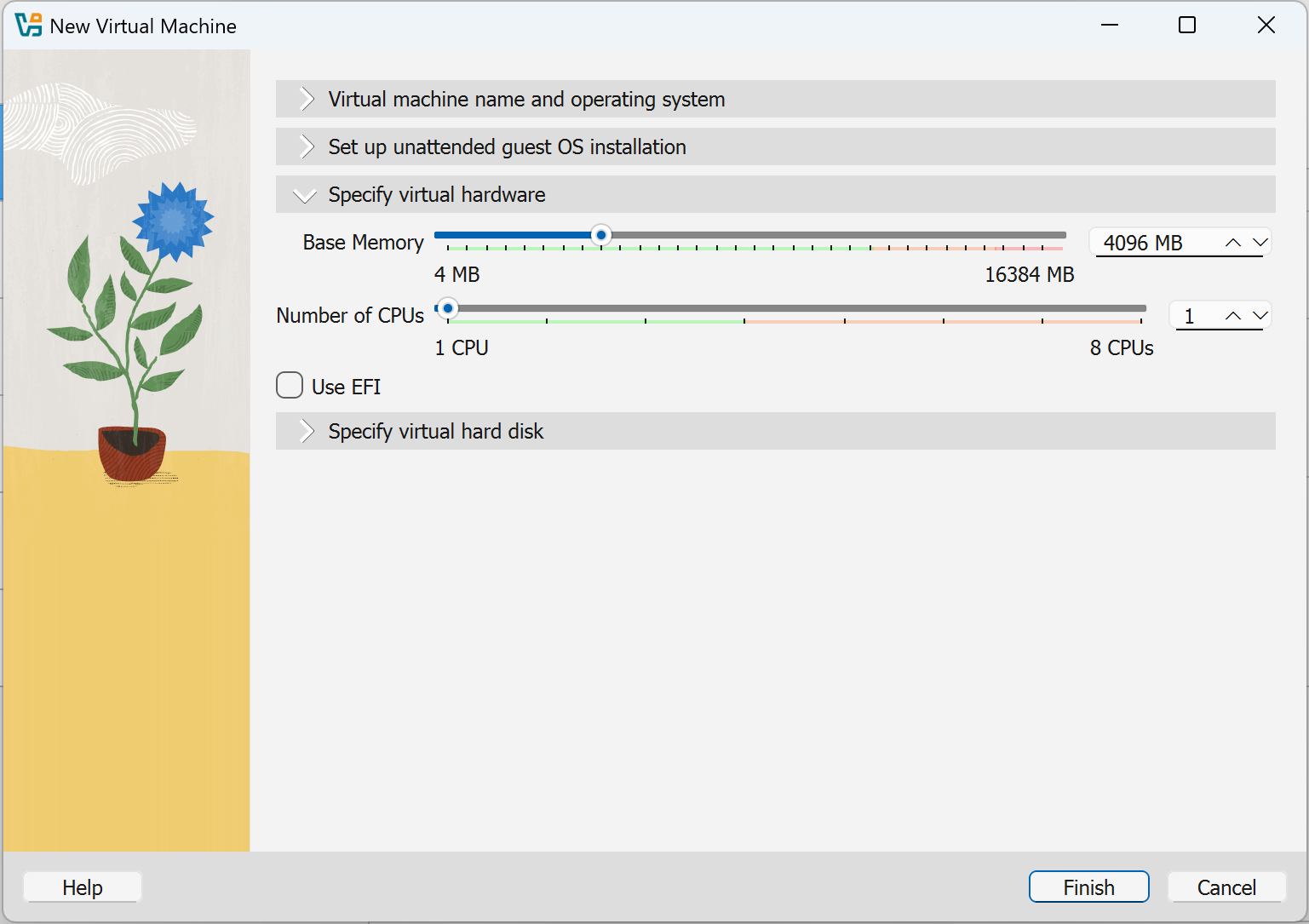
- In the VirtualBox menu, click 'New' to popup a GUI window of configure. Select "Linux" as the type and "Ubuntu (64bit)" as the version.
- The installation process requires at least 4GB of memory, but it can be reduced to 1GB during working.
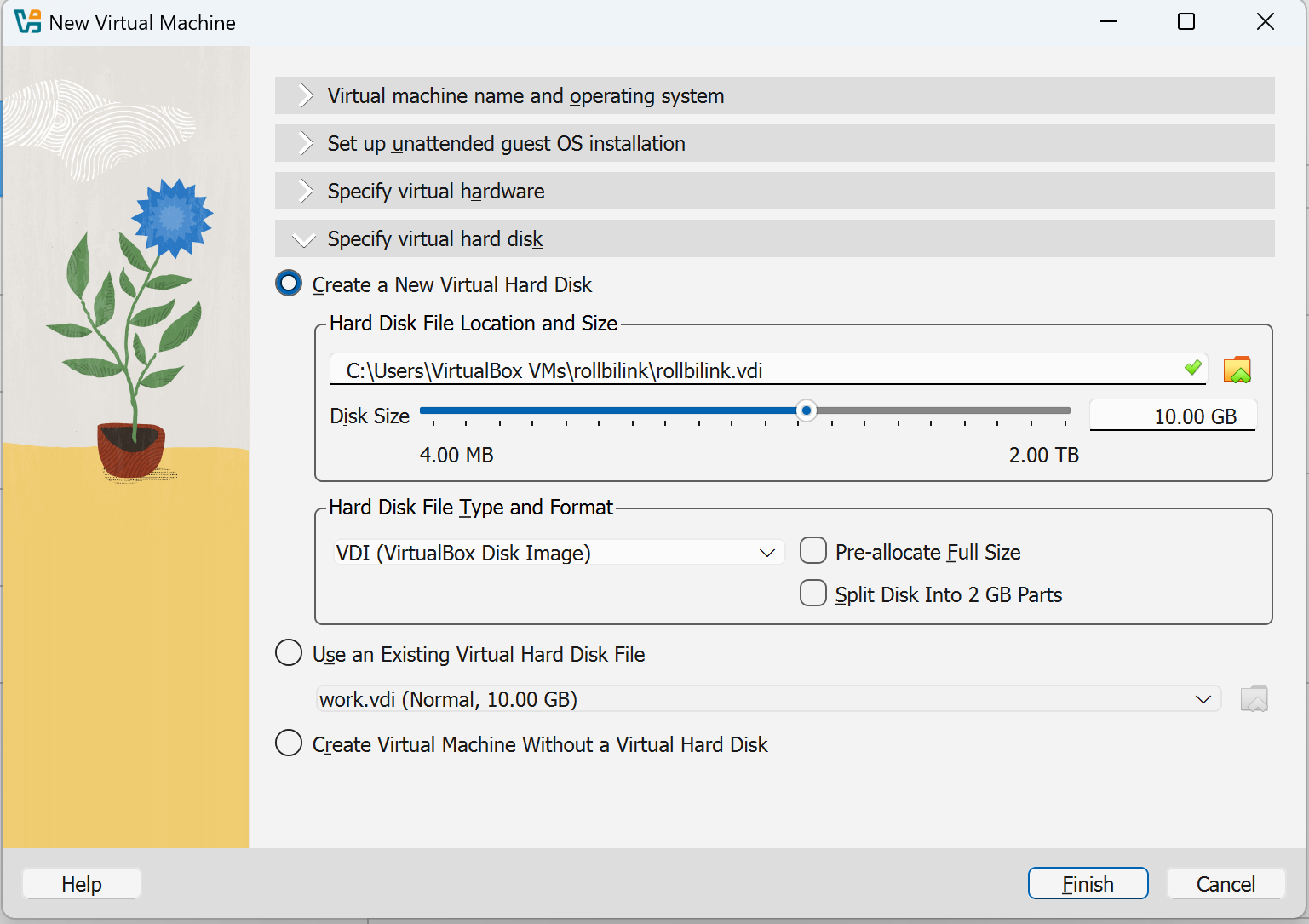
- The size of the hard drive can use the recommand value of 10G.
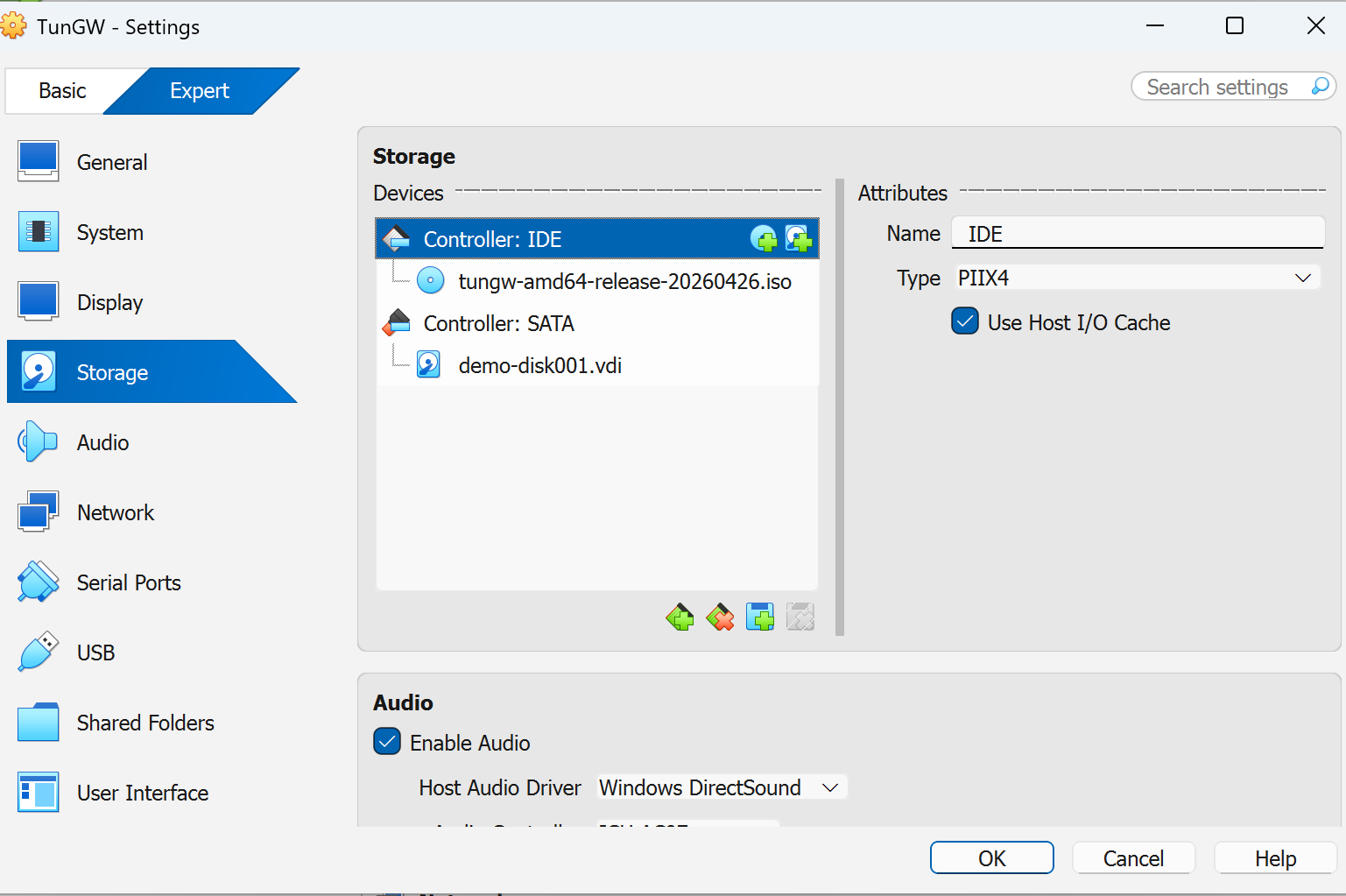
- Open the settings of the newly created virtual computer and add the ISO installation file as a virtual CD.
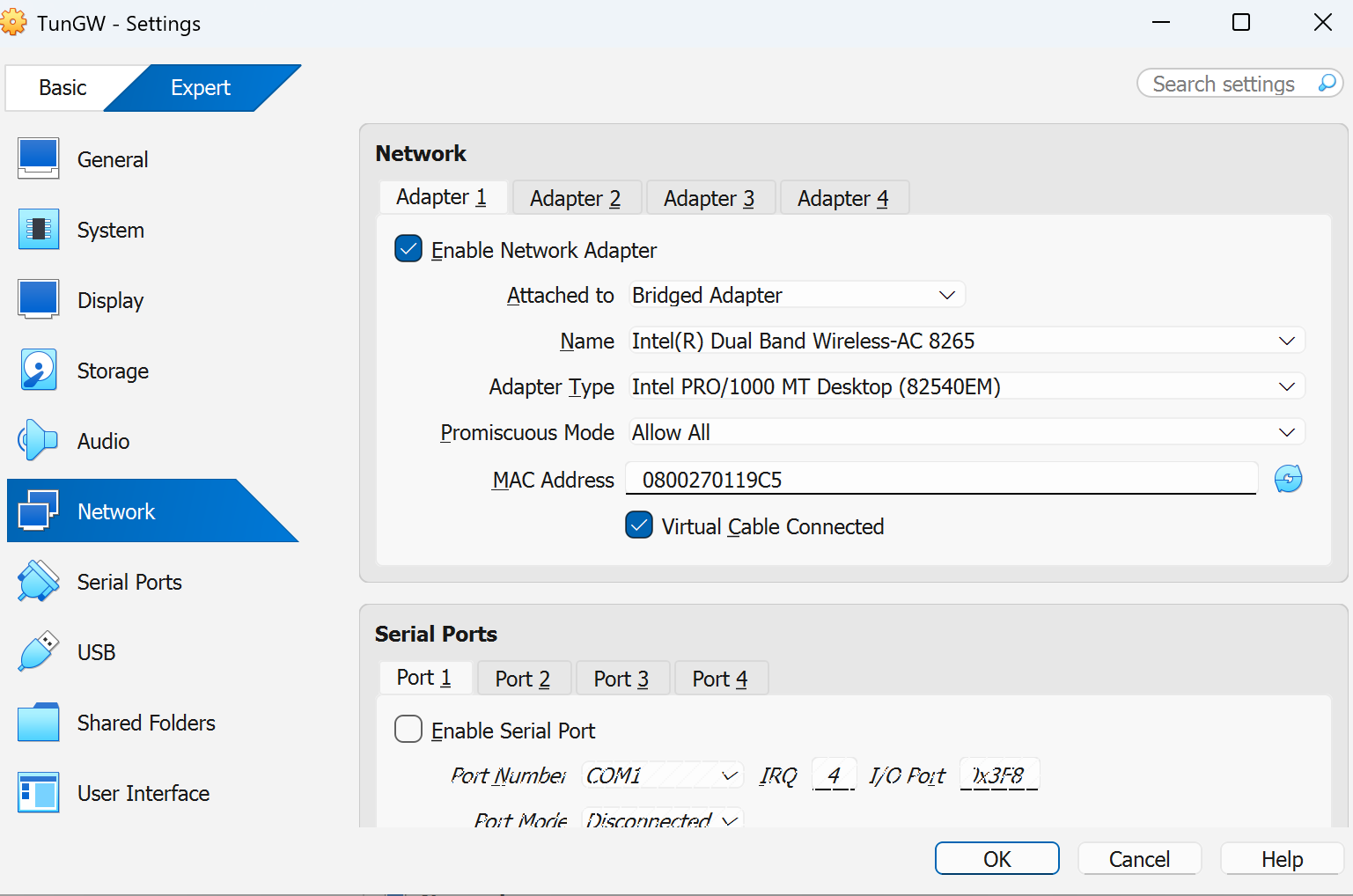
- Enable network connection in the network settings. Set the connection mode to Bridged Network Adapter. Keep other settings as default.
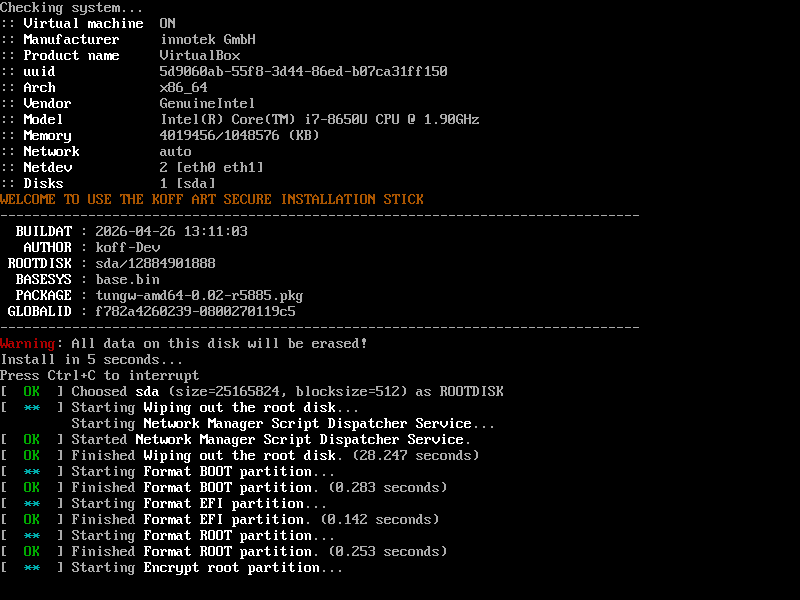
- Click the start button to open the virtual machine and proceed with the installation process. On the virtual screen, you will see the following output information.
|
|
|
|
|
|
|
After the installation is completed, the virtual computer will automatically shut down. A ROLLBILINK® virtual router has been successfully made.
Create a P2P sharing group
The ROLLBILINK® performs matching based on the shared groups. For each shared group, a server node needs to be created.
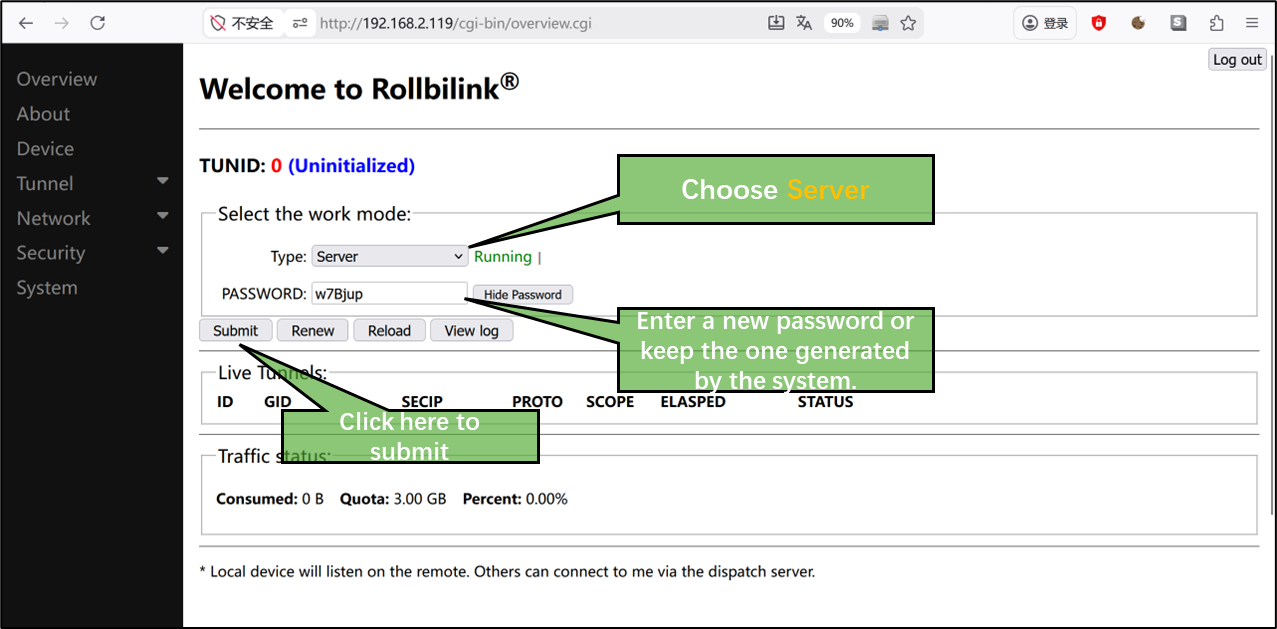
- Select a pre-made ROLLBILINK® router as the service node. Open the login page of the Web management system and enter the password set during installation.
- After successful login, it will automatically redirect to the Overview page. Refer to the following picture to set this device as a service node. You can make manual modifications. After submission, a globally unique TUNID will be obtained. Remember this ID and password for use in setting the client node.
|
|
Join the P2P sharing group
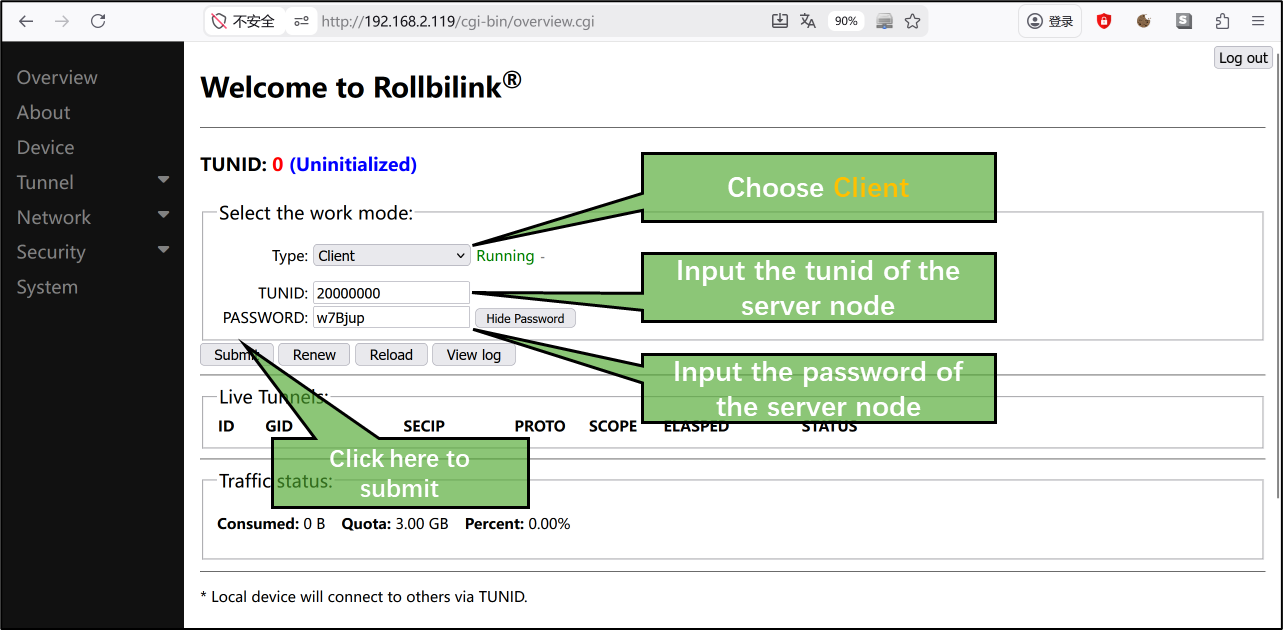
- Log in to another pre-made ROLLBILINK® router, follow the example in the picture and add the sharing group.
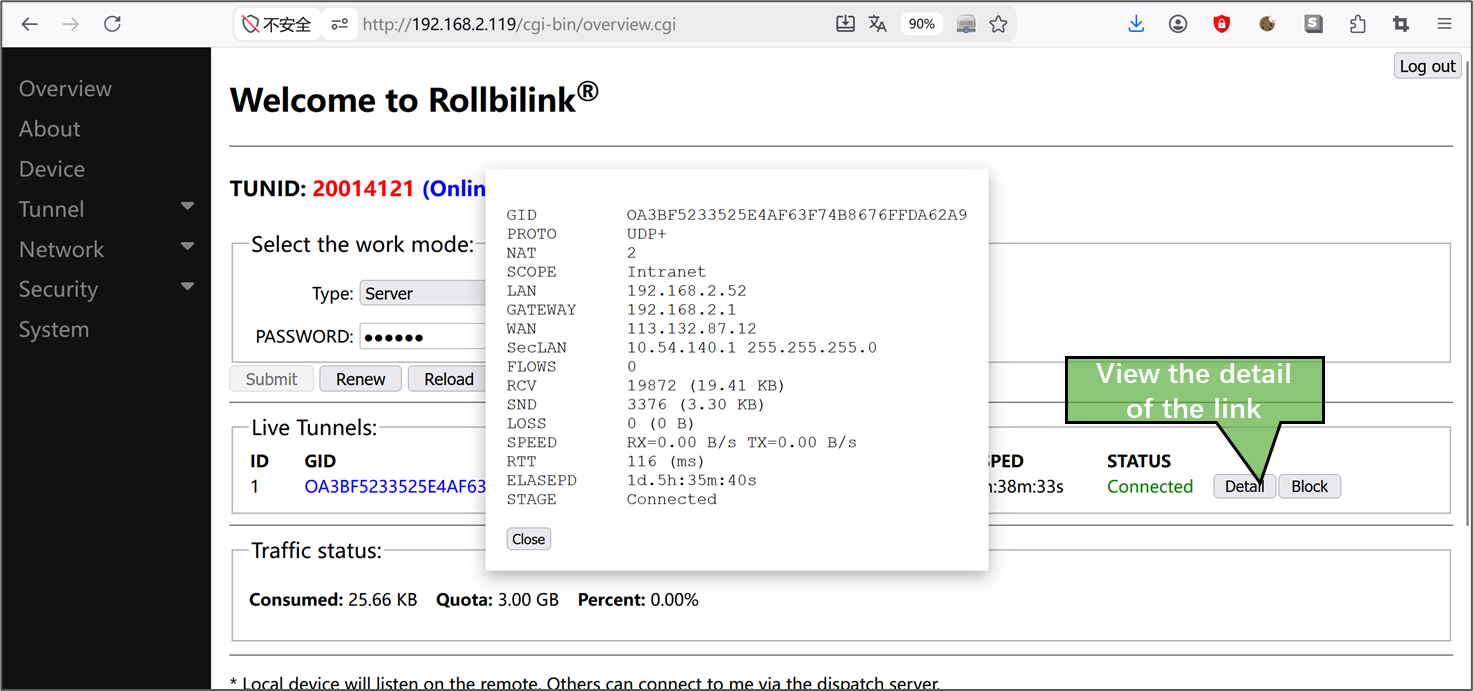
- Two ROLLBILINK® routers will automatically establish a P2P link. Clicking the "Detail" button allows you to view the link details.
|
|
By default, each shared group can accommodate a maximum of 2 ROLLBILINK® router client nodes。
Examples
- Individual players can build a secure private NAS over the internet using Raspberry Pi, virtual machine and fnOS.
- The enterprise conducts cross-regional and multi-departmental collaborative office work.
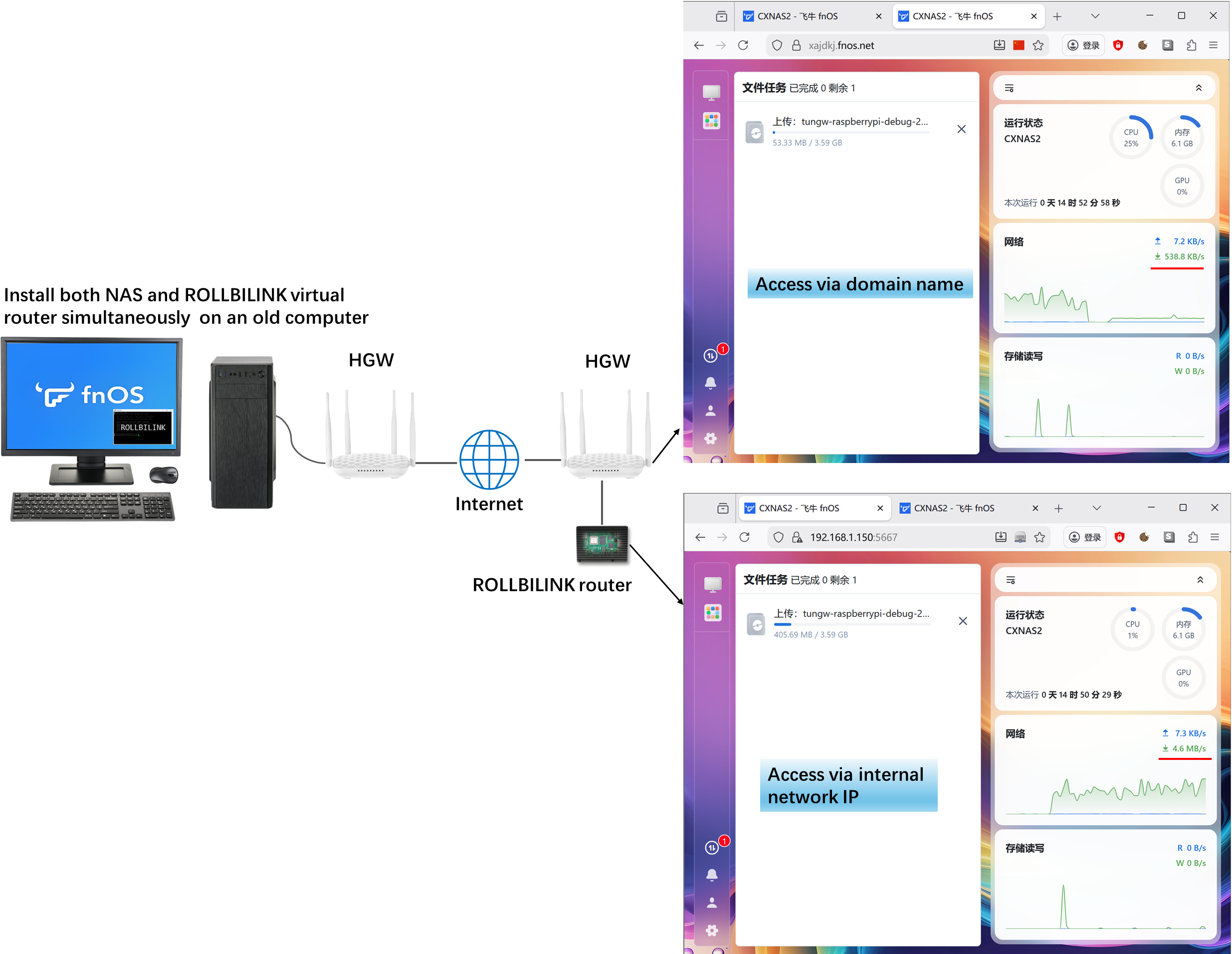
The original design intention of ROLLBILINK® is to make use of the idle Raspberry Pi and old computers of users, turning waste into treasure. Since most Raspberry Pi players only have one device at hand, for individual players, the author recommends that you adopt the combination of "Raspberry Pi + virtual machine".
In the scene shown in the picture below, an old computer is simultaneously installed with Flyng NAS and ROLLBILINK virtual machine and is placed at home. A Raspberry Pi is made into a ROLLBILINK router and carried around. When uploading files from abroad, the speed achievable with the domain name provided by Flyng is only around 500KB/s. However, by using the internal network address of the Raspberry Pi to access, the speed can be stable at around 5MB/s, which is a significant improvement of 10 times.
|
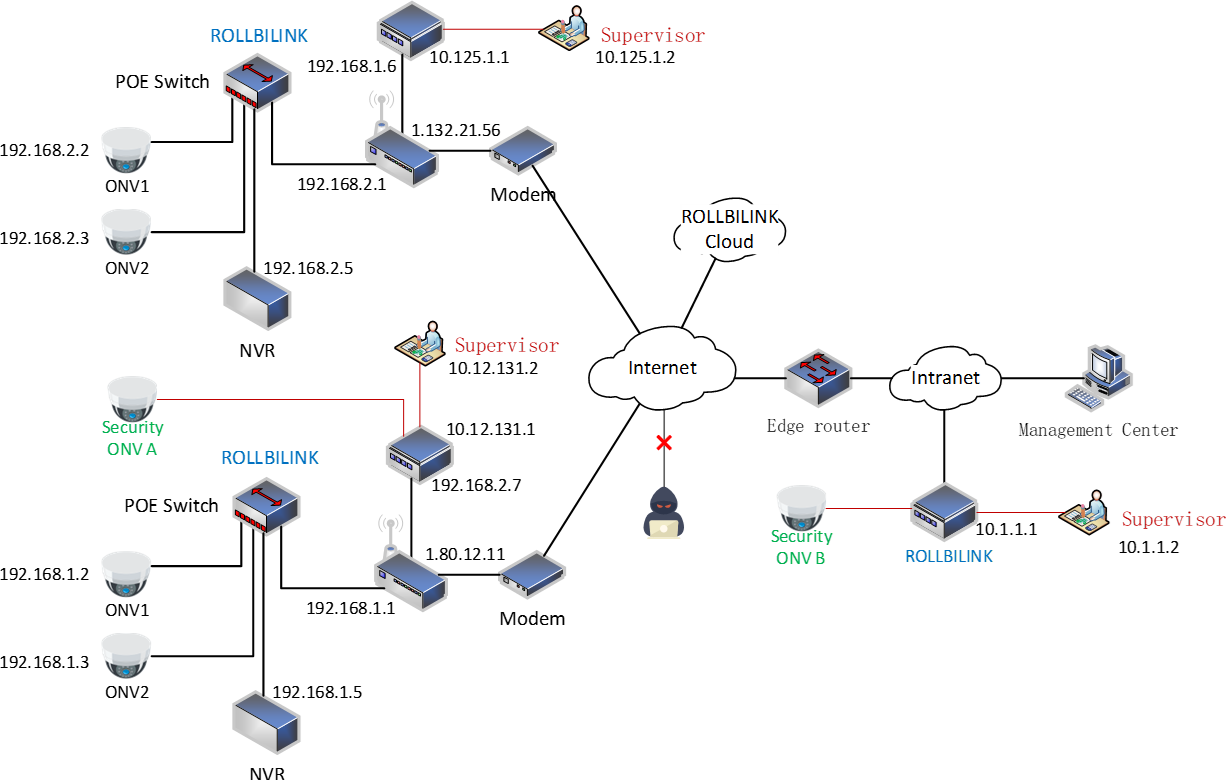
Since the ROLLBILINK® router works at the IP layer and transport layer, it can be transparently used in complex networking scenarios.
In the scenario depicted in the figure below, the enterprise not only used ROLLBILINK® routers to integrate the office networks from different regions into a virtual local area network, but also established a separate encrypted hotline among the department heads.
|
FAQ
Is it safe?
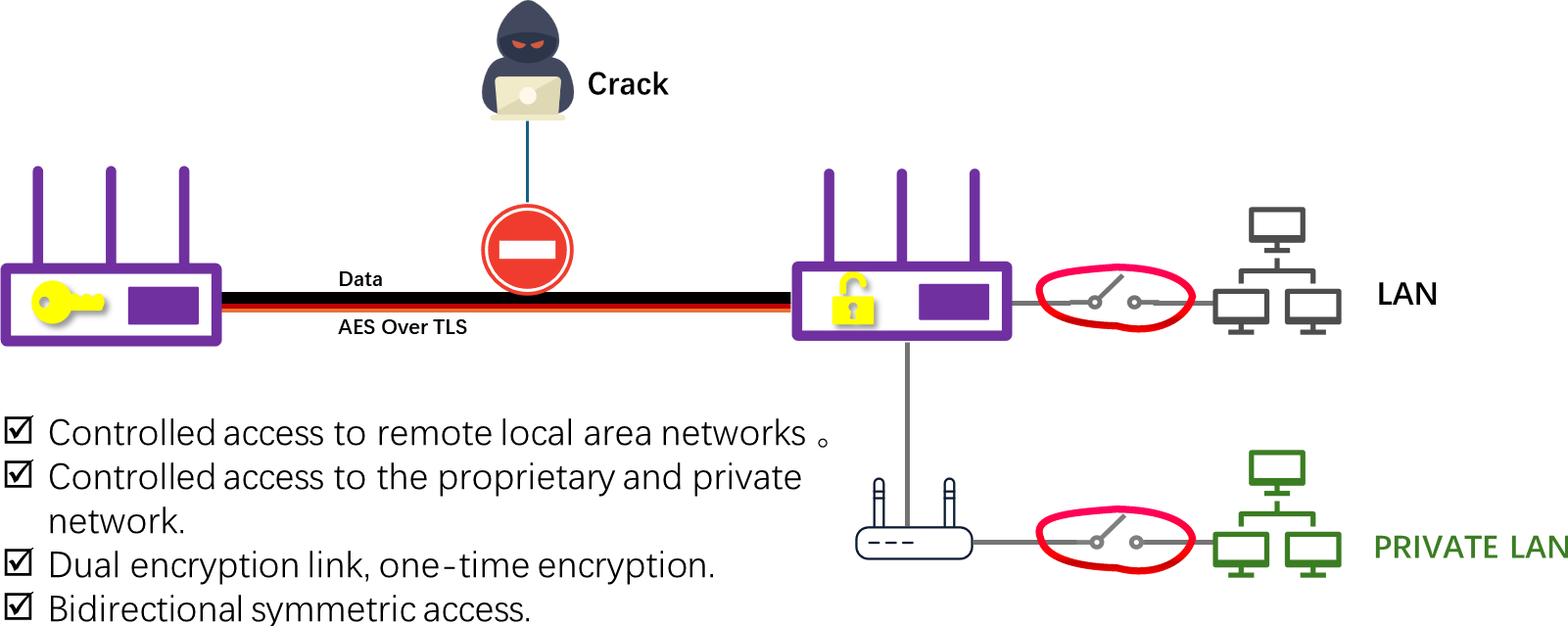
ROLLBILINK® protect your assets and network security through the following measures:
- Based on the official firmware and operating system of the corresponding hardware platform.
- The P2P function operates in user mode and does not modify the original firmware or operating system code.
- The P2P data link employs the 256-bit AES encryption algorithm. The key is dynamically generated in the cloud and is unique for each use.
- The management link is encrypted using both TLS and compression algorithms.
- Support a black-and-white list mechanism based on MAC, IP, and domain name. It complies with national security protection requirements and effectively prevents illegal access.
- Support the creation of hybrid random passwords or specified passwords. Different links work back-to-back without mutual awareness.
- The core binary files are all encrypted using LUKS and cannot be tampered with.
|
Is it free?
The ROLLBILINK® router firmware is a public welfare project. This means that its download and use are completely free. Since all communication is carried out through P2P(peer-to-peer) mode, there will be no charges for data usage like in products based on cloud forwarding.
We provide a common super management node to handle all P2P requests from user nodes. If the network environment where the user is located does not allow for P2P connections, this super node will not perform data forwarding actions.
The super node software package of ROLLBILINK® can be deployed in the cloud or on servers to serve the designated user nodes. This software package is only sold with real names for enterprise-level users and no public download links are provided at present.
Due to the excessive P2P traffic, certain firewall policies may be triggered. Therefore, the user nodes are restricted to a maximum of 3GB of traffic per week.
If you need more, please join the ROLLBILINK®QQ Discussion Group to get it for free.
Is it open source?
ROLLBILINK® is completely free but not open source. The author holds all the software copyrights and trademark registration licenses. This project does not modify the underlying operating system code, nor does it copy or reference any open-source code that follows the GPL license.
This project includes the binary versions of the following open-source software, and we pay tribute to the developers of these projects.🙏
- Ubuntu 20.04 (bonic)
- Raspberry Pi OS Lite
- UDT4
- hostapd
- wpa_supplicant
- dnsmasq
The core code of this project is 100% implemented in original C language, and all binary files are generated through GCC compilation and linking. The storage path of the core program is:/var/opt/tungw
Due to the particularity of P2P technology based on routing and transmission protocols, improper use may violate the relevant laws and policies of the user's region. To ensure the long-term, healthy and legal development of this project, the author has no intention to release it as open source.
Contact the author
About the Author
The author of ROLLBILINK® is a Chinese male who loves programming. He is a Scorpio and has an INTJ personality. He is proficient in IP technology and is skilled in C language and the Linux kernel.
You can contact the author in the following ways. He will highly appreciate the suggestions, bugs and requirements you provide.
- Welcome to contact author via QQ number: 150850930
- Join the ROLLBILINK® QQ Discussion Group: 1046452601
- Send an email to: rollbilink@163.com
Contribute
This project has been listed on 爱发电. If you like it and it really helps you, please click here here to support the author. 😍. Every penny you contribute will help make ROLLBILINK® better!
Special thanks
CheXing
My closest and most loyal 'comrade-in-arms' provided all kinds of development hardware for this project and proposed many creative features. At the same time, he also assisted me in completing all 2,000 tests.ZhangLei
The highly professional product manager proposed many practical application scenarios and facilitated my completion of a wider range of tests.Apekey
A trustworthy good buddy, a cybersecurity expert, provided me with the latest Raspberry Pi hardware for testing without any charge. They helped me identify many bugs.Casey
A sensitive and eccentric Aquarius guy with excellent academic performance and as an AI expert in a big company. If every programmer should have an inflatable duck that they can talk about anything with, then he is the one.镜花水月
A cunning professional Q&A expert, product manager and planner. Every word he says can hit the nail on the head, motivating me to keep striving.阿吉
The cold but loving Scorpio man, an algorithm expert, a painter, proficient in multiple languages. He can often spot the errors in my code at a glance, and I greatly admire his sharpness.
Finally, I'd like to share a favorite saying of mine - it comes from a legendary programmer: John Carmack.
"In the information age, the barriers just aren’t there. The barriers are self-imposed. If you want to set off and go develop some grand new thing, you don’t need millions of dollars of capitalization. You need enough pizza and Diet Coke to stick in your refrigerator, a cheap PC to work on, and the dedication to go through with it. We slept on floors. We waded across rivers."
—— Quoted from page 287 of Masters of Doom
